


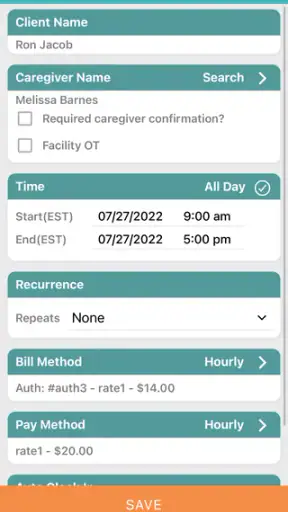
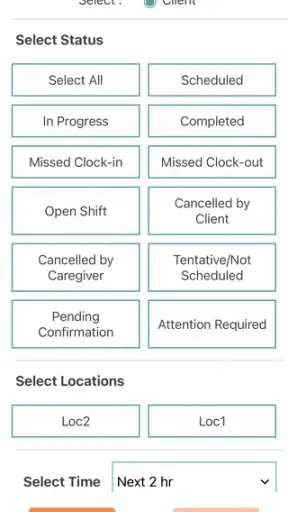
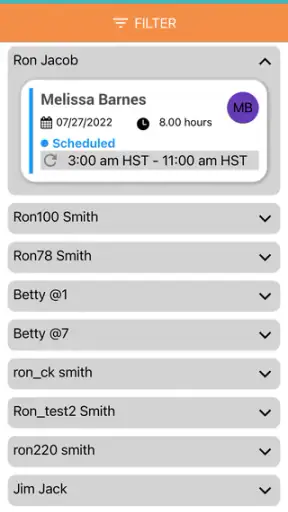
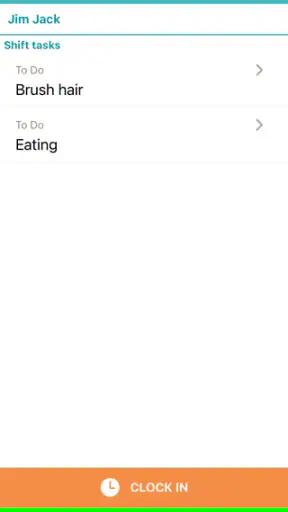
When I look at a medical app, I care less about a polished first impression and more about whether it makes sensitive care work easier without taking control away from the people involved. WellSky Personal Care is built for caregivers and administrators, so it is not aimed at someone casually tracking their own wellness. I see it as a work tool for organizing personal-care duties, keeping activity connected to the right people, and giving care teams a mobile way to handle responsibilities that might otherwise depend on paper notes, phone calls, or a desktop system.
That focus makes it a very different proposition from a symptom checker, medication reminder, fitness tracker, or telehealth service. The app sits closer to the operational side of home care. If you are a caregiver using it as part of an organization’s workflow, its value depends on how well it fits that workflow. If you are looking for an independent health app that you can open and use without an employer or care provider, this is probably not the right place to start.
What WellSky Personal Care is really for
WellSky Mobile Apps develops the application, which is available as a free app for everyone and has been on the market since late September 2017. Its medical category can make it sound like a patient-facing health product, but the more useful way to understand it is as a mobile companion for personal-care operations. The intended audience includes people delivering care and administrators coordinating it.
That distinction matters before you install it. A caregiver may need mobile access while moving between visits, while an administrator may use the broader care system to organize information and oversee work. The app is therefore most useful when it is connected to an existing care arrangement. It is not something I would recommend downloading simply because it is free and expecting it to create a care plan on its own.
The application has reached more than a million installs and holds an average rating of 3.8 from roughly thirty-four thousand ratings, with about fourteen thousand written reviews. Those figures suggest a substantial user base, but they also tell me to keep expectations realistic: a tool used by different agencies, administrators, and caregivers will not feel equally smooth in every setup. The quality of the experience can depend on how an organization configures its processes and how consistently staff use them.
I also appreciate that the age classification is Everyone. That does not turn the app into a general family health tool, and it does not remove the need for careful handling of care information. It simply means the app is not presented as age-restricted entertainment or as something containing mature material. In a medical setting, the more important question is who has an account, what role they have, and what they are expected to do with the information they can access.
Trust starts with the role the app plays
My first trust check is whether an app is honest about its job. Here, the name and summary point toward personal care and administrative work rather than promising diagnosis or treatment. That is a good boundary. I would not use it to interpret symptoms, replace professional judgment, or decide whether an urgent medical problem can wait. Its sensible role is supporting the human process around care, not acting as the clinician.
That boundary is especially important for family members. A relative might be involved in someone’s care but still not be the intended account holder or decision-maker. Before relying on the app, I would ask the agency or care provider who is expected to use it, which tasks belong there, and where urgent concerns should be reported. Those questions are more useful than assuming that every person connected to a client should have the same access.
The current version is 26.7, and the app supports Android 7.0 and later. That broad device compatibility is helpful for organizations working with a mixed collection of phones, particularly when not every caregiver has a recent handset. At the same time, an older supported operating system does not guarantee that every device will feel equally fast or convenient. I would test it on the actual phone used during visits rather than judging the experience from a newer personal device.
Account access deserves practical attention
Because this is an organizational care app, account control is more important than the download price. The app itself is free, but that does not mean it independently supplies a complete care service. In practice, I would expect the relevant organization to explain how a caregiver receives access, how an administrator manages users, and what happens when someone changes role or leaves the team.
That is also where I would look for the clearest user choices. Can a caregiver see only the people and tasks relevant to the assigned work? Is access removed promptly when duties end? Who should be contacted if an account appears to show the wrong information? These are questions I would raise with the care organization, not guess from the app icon or its store description.
The most trustworthy workflow is one where access follows responsibility. A caregiver should not need broad visibility simply because the app is convenient, and an administrator should have a clear process for correcting accounts. If an organization cannot explain those basics, I would be cautious about treating the app as the single source of truth for sensitive care work.
What I would check before the first real visit
Before using the application during a busy shift, I would sign in while connected to a reliable network and confirm that the correct account and care context appear. I would also make sure I know how to report a discrepancy. A wrong assignment, incomplete instruction, or outdated detail is not a small interface annoyance when another person’s care depends on it.
I would then walk through the normal routine without rushing: open the relevant work area, review what is expected, record what the organization asks me to record, and check whether the result is visibly saved or submitted. This kind of rehearsal is one of the most useful things a caregiver can do because it separates learning the app from dealing with a real person’s immediate needs.
A second practical tip is to avoid treating a successful screen transition as proof that a task has been communicated to everyone. If the workflow includes an administrator or supervisor, I would ask how updates are reviewed and how exceptions are escalated. Mobile software can make entry convenient, but responsibility still depends on the team’s process around that entry.
Using it around sensitive care moments
Personal-care work often happens in private homes and under time pressure. A caregiver may be moving between rooms, helping someone with daily activities, or responding to a family member’s question while trying to keep records accurate. In those moments, a phone can be useful and distracting at the same time. My advice is to use the app at deliberate pauses rather than trying to type while physically assisting someone.
That is not merely a usability preference. It reduces the chance of entering information under the wrong person, missing a detail, or leaving a phone visible when privacy calls for more care. I would keep the device with me, avoid discussing sensitive information where unrelated people can hear, and follow the organization’s rules for locking the phone and handling the account.
One realistic scenario is a caregiver finishing a home visit and needing to document the work before traveling to the next appointment. The app may be more useful here than a paper note that can be misplaced or a memory-based update made hours later. I would first move to a quiet moment, confirm the correct care context, enter only what the workflow requires, and review the submission before leaving. If something unusual happened, I would use the organization’s established escalation route rather than assuming a routine entry is enough.
Another scenario involves an administrator reviewing several caregivers’ work. A mobile record can make information available sooner than a stack of handwritten sheets, but speed creates a temptation to skim. I would not interpret a completed entry as proof that the underlying care was complete. The app can support oversight; it cannot replace supervision, conversation, or professional review when a situation is unclear.
Where user choice matters most
In a care setting, user agency is not just the ability to tap buttons. It means understanding what is being recorded, knowing who can act on it, and having a way to correct mistakes. I would want caregivers to be trained on the difference between routine documentation and an urgent concern. I would also want administrators to make correction procedures easy to find instead of forcing staff to improvise.
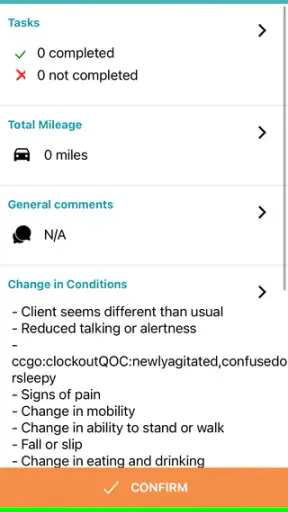
A useful habit is to pause before submitting anything that could affect another person’s care. Check the identity, date or visit context shown by the workflow, and the wording of the entry. If the app presents a confirmation step, use it as a review rather than tapping through automatically. This is a small discipline, but it is more valuable than trying to complete records as quickly as possible.
There is a trade-off here. A structured app can reduce the ambiguity of free-form notes, yet structure can also feel restrictive when a situation does not fit the expected routine. If the available choices do not describe what happened, I would not force an inaccurate selection just to finish. I would ask the supervisor how exceptions should be recorded. That preserves the meaning of the record and keeps the app from becoming a source of false certainty.
I would also be careful with shared phones. If several caregivers use one device, the organization needs a clear sign-out and sign-in routine. Otherwise, the convenience of shared hardware can undermine accountability. The application may be part of the solution, but the human procedure remains essential: each person should know when the device is theirs, when it is not, and how to prevent another user from working under the wrong account.
Privacy questions I would ask directly
For any medical application, I want to understand the data choices presented during setup and use. I would read the permission prompts instead of approving everything automatically, and I would check the device’s app settings if I needed to review or change access. I would also ask the responsible organization what information is entered, who can view it, how corrections are handled, and whom to contact about account or privacy concerns.
I am deliberately separating those questions from assumptions about the software. A store page can identify the app’s purpose, but a care organization determines much of the practical context in which it is used. That means trust should be evaluated at two levels: the app’s visible controls on the phone and the organization’s rules for accounts, records, devices, and staff access.
Notifications deserve the same caution. If the application displays alerts on a locked screen, nearby people might see more than intended. I would review notification settings and choose the least revealing option that still lets me do the job. I would not disable important work alerts without checking with the administrator, but I would also avoid leaving sensitive previews visible in a shared household or public place.
When a caregiver changes phones, loses a device, or stops working with an agency, the account should be treated as part of the offboarding process. I would report the change promptly rather than assuming that uninstalling the app is enough. Removing an icon does not necessarily resolve account access, and a lost phone should be reported as a security issue, not merely a hardware inconvenience.
How it compares with ordinary alternatives
The obvious alternative is paper documentation. Paper can work without a battery or network and may feel faster for a quick note, but it is harder to review consistently, easier to misplace, and more dependent on later manual handling. A mobile workflow can reduce those handoffs, provided caregivers have working devices, appropriate access, and enough time to enter information carefully.
Another alternative is communicating through calls, texts, or general messaging apps. Those tools are familiar, but they can scatter important details across personal phones and conversations. They may also make it difficult to distinguish a formal care record from an informal update. I would prefer the dedicated app for the organization’s defined workflow, while keeping the approved escalation method available for urgent or unusual situations.
A general notes app is flexible, but that flexibility is precisely its weakness in a coordinated care environment. It may not provide the same role-based structure or shared process expected by an agency. I would choose a general note-taking tool for personal reminders, never as a substitute for the organization’s designated record when the information affects another person’s care.
On the other hand, a large desktop care-management system may be better for administrators who need a wide view and detailed oversight. The mobile app makes more sense for work that happens away from a desk. The best choice is not necessarily either-or: administrators may prefer a full system for planning, while caregivers need a focused mobile route for completing assigned work. Whether that combination works depends on the organization’s implementation.
Who should use it, and who should skip it
I would recommend WellSky Personal Care to a caregiver whose agency already uses it and provides clear instructions. It can be a practical fit for someone who needs to work from a phone, follow an established personal-care process, and pass information back to an administrator without relying on loose paper or personal messages.
It may also suit an administrator who wants caregivers to have a consistent mobile workflow. The important word is “consistent.” If staff are not trained, if account responsibilities are unclear, or if the organization does not respond to corrections, the app cannot solve those operational weaknesses by itself.
I would skip it if I were looking for self-directed health tracking, medical advice, appointment discovery, medication education, or a family diary with no organizational connection. I would also hesitate if my employer expected me to use it but could not explain access, privacy expectations, or what to do when the app and the real-world situation disagree.
For a caregiver with an older Android phone, the stated minimum of Android 7.0 is reassuring in principle, but I would still check performance, battery condition, and connectivity during the actual workday. A supported operating system is only one part of reliability. If the phone is shared, frequently offline, or difficult to keep charged, the organization should provide a practical backup process rather than expecting the caregiver to improvise.
My cautious verdict after weighing the trade-offs
I see WellSky Personal Care as a focused professional tool rather than a general medical companion. Its strongest case is straightforward: caregivers and administrators need a mobile way to participate in an organized personal-care workflow. Its free availability and broad Android support lower the barrier to trying it, while its established presence and large user community show that it is being used at meaningful scale.
My reservation is not about the idea of the app; it is about the conditions around it. Sensitive care information deserves careful account management, thoughtful notification settings, deliberate device handling, and a clear correction path. The app can support those habits, but it cannot create them for an organization that has not defined them. I would judge the complete workflow, not just the app’s screens.
For someone already connected to a WellSky Personal Care program, I think it is worth learning properly and testing during a quiet practice session before relying on it in a visit. Use the correct account, verify the care context, review entries before submitting, and ask where unusual situations belong. Those steps make the mobile convenience safer and more useful.
For everyone else, I would not install it expecting a personal health service. My recommendation is conditional but positive: use it when a responsible care organization has assigned it, explained its controls, and backed it with human oversight. In that setting, it can reduce avoidable paperwork and keep care work more organized. Without that setting, a different kind of medical app will be a better match.
With its current version 26.7 and support for Android 7.0 or later, the app remains accessible to many devices. I would treat that as an invitation to evaluate it in the real care environment, not as a promise that every setup will be effortless. For the right caregiver or administrator, WellSky Personal Care is most valuable when it quietly supports good routines, respects user responsibility, and never encourages the phone to replace careful judgment.


